GEPCO Bill Check Online 2026 – View, Download & Print Duplicate Bill
To check your GEPCO bill online, enter the 14-digit Reference No or 10-digit Customer ID from any older bill into the tool below. Your latest bill opens straight from the official PITC portal, free to view, download or print. Works for every connection in Gujranwala, Sialkot, Gujrat, Narowal, Hafizabad and Mandi Bahauddin. You can read 11th class result 2026 guide.
GEPCO Bill Check Online
Enter the Reference No or Customer ID from any older bill to open your latest GEPCO bill from the official portal.
- Find the CONSUMER DETAIL box in the top-left corner of any older GEPCO bill.
- REFERENCE NO is the 14-digit number; the opening digits identify your GEPCO office and sub-division.
- CONSUMER ID is the 10-digit number below it. Either one opens the same bill.
- Type digits only — the spacing appears on its own.
How to Check Your GEPCO Bill Online
Three ways to open your bill. Pick whichever number you can find first.
Check by Reference No (14 digits)
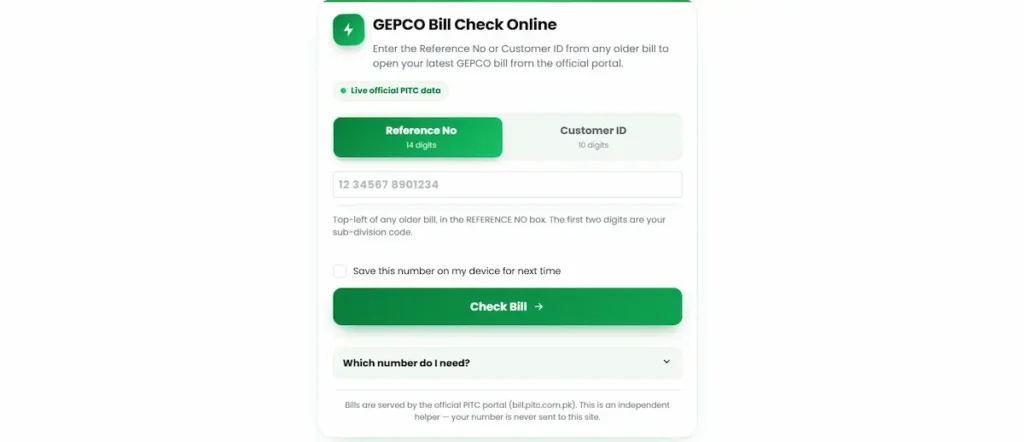
- Open the tool above. The Reference No tab is selected by default, so you can start typing straight away.
- Enter your 14 digits. The field spaces them out as 2 5 7, matching how they are printed on your bill, which makes a wrong digit easy to spot. Paste works too — spaces, dashes and a trailing letter are stripped out automatically, so there is no need to clean the number up first.
- Watch for the green tick. A bar fills under the field as you type. Once all 14 digits are in, a tick appears with the line “That number looks complete.” That confirms the length is right before you submit.
- Tick “Save this number on my device for next time” if you check every month. It stays in your own browser on your own phone. Nothing is sent to this site.
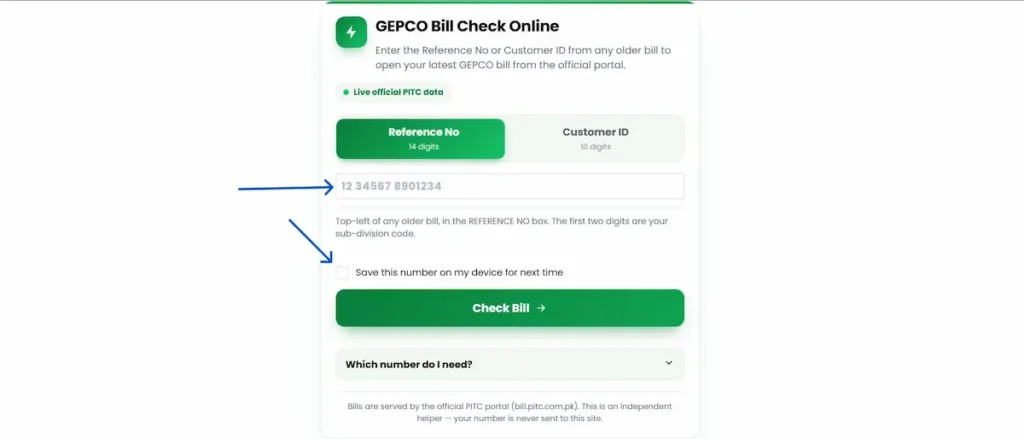
- Press Check Bill. Your bill opens in a new tab on the official PITC portal.
- Give it up to a minute. The portal slows in the evenings, and slows badly in the last few days before a due date when most of the region is checking at once. Do not close the tab or refresh — a reload puts you back at the end of the same queue.
Check by Customer ID (10 digits)
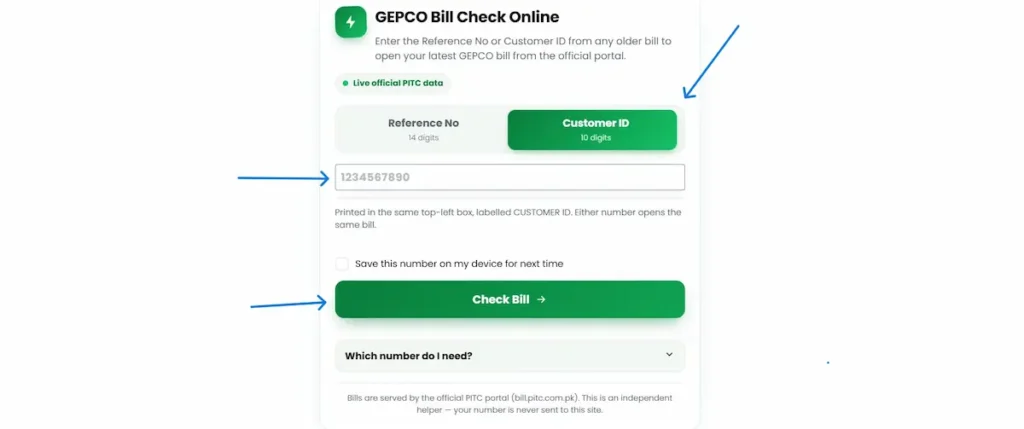
- Tap the Customer ID tab at the top of the tool.
- Enter your 10 digits. Same tick, same save option.
- Press Check Bill. Same portal, same bill.
Scan the QR code on your bill
Your bill carries two QR codes. Open your phone camera, point it at the code, and tap the link that appears. No scanner app needed on any current Android or iPhone.
- Top right, beside the GEPCO logo — opens bill payment.
- Lower down, next to the charges section — opens the detailed charge breakdown. Use this one to see how the amount was worked out rather than to pay it.
Scanning skips typing fourteen digits, which removes the most common reason a lookup fails.
Applied for a new connection and have not received a bill yet? Here is how to check your demand notice instead.
Where to Find Your Reference No and Customer ID
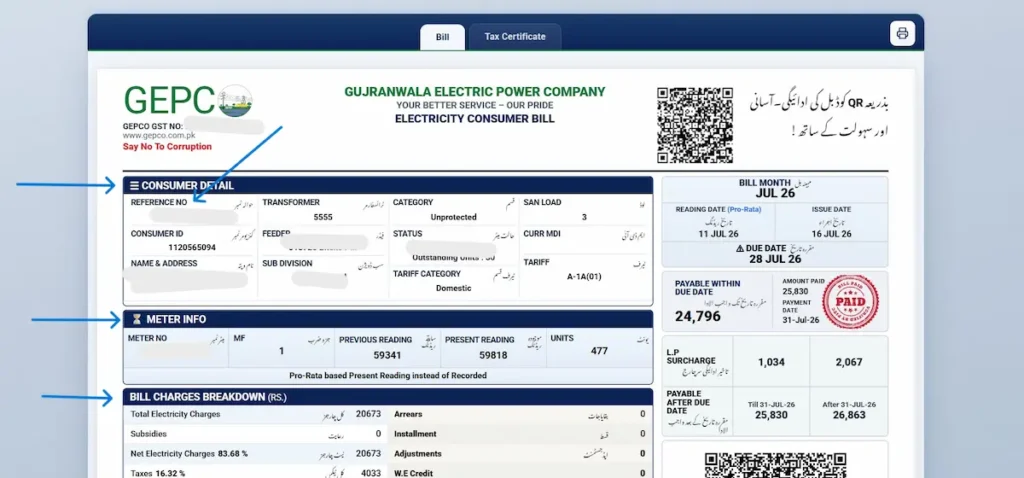
Both numbers are printed in the CONSUMER DETAIL box in the top-left corner of your bill. REFERENCE NO is the first field in that box. CONSUMER ID sits directly underneath it.
They are printed a second time, in a green box at the bottom right of the payment stub, next to the barcode. That copy is worth knowing about. Thermal-printed bills fade from the top down, and torn or rain-damaged bills usually lose the header first, so the stub is often readable when the top of the page is not.
The Reference No is printed in three groups: two digits, then five, then seven. The opening digits identify the GEPCO office and sub-division that handles your connection, and the rest identifies your individual meter.
That is why a neighbour’s bill on the same street begins with the same digits as yours. Useful to know if you have lost every copy of your own bill, which is covered next.
The same CONSUMER DETAIL box also lists your SUB DIVISION, FEEDER and TRANSFORMER. The Sub Division name is the one to quote when you call or visit a local office. Giving it up front saves the staff looking it up and gets your query to the right desk faster.
Lost Your Bill? How to Find Your Reference Number Without It
Can you check a GEPCO bill by CNIC?
No. The portal accepts the 14-digit Reference No or the 10-digit Customer ID, and nothing else. There is no name search, no CNIC search and no meter number search. The confusion is understandable, because CNIC is used across almost every other GEPCO service. New connection applications need it. So do name changes, subsidy verification and complaint records. Bill lookup is the exception.
If a website offers to find your bill from your CNIC, treat it as a warning sign. Handing your identity card number to an unverified site carries a real risk, and it will not produce your bill in any case.
Ways to get your number back
Work down this list. Most people find it within the first three.
- Your payment history. Open JazzCash, EasyPaisa or your bank app and look at past bill payments. The reference number is stored against every transaction you have made.
- An old bank receipt or counterfoil from a counter payment.
- Your meter card, or the original connection agreement if you own the property.
- A bill kept for something else. Many households file one for tax records or as address proof for a bank or school.
- Your phone gallery or WhatsApp. Search around the dates you usually pay. Photographing the bill before paying is a common habit.
- A neighbour’s bill. The opening digits will match yours. That tells the office your sub-division immediately, which turns a slow search into a quick one.
- Helpline 118, or SMS to 8118, for a manual lookup against your account.
- Your Sub Division office, with your CNIC and the property address. This is the route that always works, including for connections in a previous owner’s or landlord’s name.
Once you have it back, tick Save this number on my device for next time in the tool above so you are not repeating this next month.
Reference No or Customer ID: Which One Should You Save?
Both work in the tool. Both are printed on every bill you receive, and neither changes from one month to the next. Your connection keeps the same pair of numbers for as long as it exists.
If you have read elsewhere that the Reference No changes each billing cycle, that is wrong. Compare any two of your own bills and you will see the same 14 digits on both.
The practical split:
- Save the Reference No. It is what banks, JazzCash, EasyPaisa and the complaint system ask for. Keep it in your notes app, or tick the save box in the tool above.
- Memorise the Customer ID. Ten digits is a realistic thing to hold in your head. That matters on the one day you are standing at a bank counter with no bill and no phone signal.
Download, Print or Save Your GEPCO Duplicate Bill
Once your bill opens on the portal, look for the print icon at the top right of the page.
On a computer, that sends it to your printer. On a phone, the same button opens the print dialogue, where you choose Save as PDF instead of a printer. The file lands in your downloads folder and can be forwarded on WhatsApp or email.
Note the two tabs across the top of the portal view: Bill and Tax Certificate. The print button applies to whichever tab is open, so make sure you are on the right one before pressing it.
Will a printed copy be accepted at the bank?
Yes. The duplicate carries the same barcode, the same reference number and the same payable amounts as the copy delivered to your door. Counter staff scan the barcode, and in most branches they will scan it straight off your phone screen without you printing anything. The same applies at post offices, NADRA e-Sahulat points and any authorised collection agent.
Using your bill as proof of address
An electricity bill is one of the documents most commonly accepted for address verification in Pakistan: opening a bank account, KYC updates, school and college admissions, passport and CNIC address changes, and tenancy paperwork.
If you need it for that purpose, print the full page. The NAME & ADDRESS field in the Consumer Detail box is what the clerk is checking. A screenshot of the amount is not enough, and a partial print that cuts off the address will be sent back.
How to Check Old GEPCO Bills and Payment History
The portal shows your current bill. It is not an archive, and there is no page where you can pull up a PDF of a bill from two years ago. Any site claiming otherwise is describing something that does not exist. What you can get is usually what people actually need.
The Bill History table on your bill
Every bill you generate prints a BILL HISTORY block covering the previous twelve months. Each month has four columns: Status, Units, Bill (Rs.) and Payment (Rs.).
Read it two ways.
Run down the Units column to find the month your consumption actually changed. That is the honest record of usage, unaffected by tariff movements, and it usually settles the question of whether a high bill came from higher usage or from something else.
Then compare Bill against Payment line by line. A month where the payment figure is lower than the billed figure, or shows zero, is where an arrear started. That is the single most useful thing on the whole bill for anyone disputing a balance.
Two rows sit below the table. Deferred Amount shows any sum formally postponed. Outstanding Install. shows the balance remaining if you are paying an old arrear in instalments.
The Tax Certificate tab
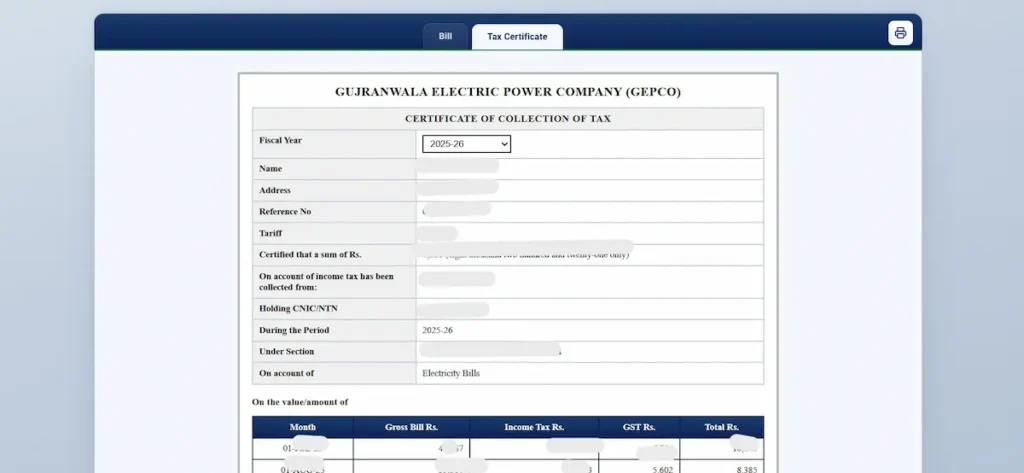
Open the Tax Certificate tab at the top of the portal view. It produces a statement of the income tax deducted through your electricity bills.
You need this when filing your return, or when claiming that deduction as an adjustment. Businesses and commercial connections need it more often than households. It prints exactly the same way as the bill.
Getting a genuine archived copy
For a specific bill older than twelve months, submit a written request at your Sub Division office. Quote the reference number and the exact billing months you need. Take your CNIC.
How to Check Whether Your Bill Is Paid or Unpaid
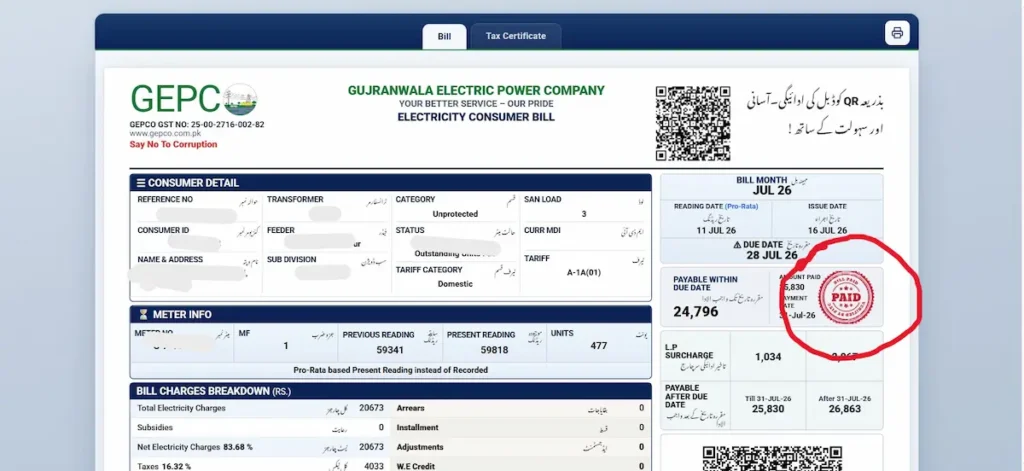
Look at the payment block on the right side of the bill.
A cleared bill carries a PAID stamp, alongside AMOUNT PAID and PAYMENT DATE. If those fields are empty, the bill is still outstanding on the system.
Allow for the lag. A payment made through a bank app, wallet or counter can take a working day or two to reach the billing system, and longer over a weekend or public holiday. A bill you paid this morning will not show a stamp this afternoon. Keep the transaction screenshot or receipt until the stamp appears. If it has been more than three working days, that receipt is what resolves it with the Sub Division office.
Reading Your GEPCO Bill: Every Box Explained
Consumer Detail
The top-left box, and the one worth understanding properly.
| Field | What it tells you |
|---|---|
| Reference No | 14 digits, permanent |
| Consumer ID | 10 digits, permanent |
| Name & Address | The registered account holder |
| Transformer | The transformer feeding your connection |
| Feeder | Your 11kV feeder, which determines your load shedding schedule |
| Sub Division | The office that handles your billing and complaints |
| Category | Protected or Unprotected |
| Status | Normal, or Pro-Rata with outstanding units |
| Tariff Category | Domestic, Commercial, Industrial, Agricultural |
| San Load | Sanctioned load in kW |
| Curr MDI | Maximum demand recorded, on applicable connections |
| Tariff | Your tariff code, such as A-1A |
The Tariff code decides which rate table applies to you. If a house is billed on a commercial code, or a shop on a domestic one, every figure below it is calculated from the wrong schedule. It is a real and correctable error, and it is worth checking once rather than never.
Status deserves a closer look. If it reads Pro-Rata Consumption with a number of Outstanding Units, your meter was read part-way through the cycle rather than at month end. Only part of your usage was billed. The remaining units carry forward and appear on next month’s bill. This is not a mistake, and it explains a pattern that confuses a lot of people: one unusually low bill followed by an unusually high one.
Meter Info
Meter No, MF, Previous Reading, Present Reading, Units.
The arithmetic is printed in front of you:
(Present Reading − Previous Reading) × MF = Units billed
MF is the multiplying factor, and on a standard single-phase domestic meter it is 1. Walk out to your meter and read the digits on the face. If they are close to the Present Reading on your bill, allowing for the days that have passed since the reading date, the bill is working from a correct figure. Ten seconds, and it catches most reading errors before they turn into an arrear.
Bill Charges Breakdown
The rows, in the order they appear:
Total Electricity Charges — units multiplied by your tariff rate. Subsidies — any relief applied to your category. Net Electricity Charges — the two combined. Taxes — shown as a percentage of the bill. Arrears — unpaid balance carried forward, printed as amount over months. A negative arrear is a credit from earlier overpayment and reduces what you owe. Installment — a scheduled portion of an old balance. Adjustments and W.E Credit — corrections applied by the billing system. Grand Total — the payable figure.
The individual levies inside those totals:
- Fuel Price Adjustment (FPA/FCA) is notified monthly by NEPRA and can be positive or negative. Your bill prints a plain line stating which month’s adjustment is included and what it added in rupees, so you never have to guess.
- Quarterly Tariff Adjustment applies for notified quarters and can also be a credit.
- Financing Cost Surcharge is charged per unit consumed. Several rate pages describe it as a small percentage of the bill total. It is not. It is a per-kWh figure, which means a household using 400 units pays roughly four times what a household using 100 units pays on that line.
- Electricity Duty is a provincial levy on variable charges. GST is federal. TV Fee is collected on behalf of Pakistan Television. Income Tax applies above a billed threshold, and it is this deduction that appears on your Tax Certificate.
The meter reading photo
Your bill prints a photograph of your meter face, taken at the moment of reading. Stamped across it are the reader’s name, the date and time, your reference number and GPS coordinates. Use it. Zoom in on the digits in the photograph and compare them to the Present Reading printed in the Meter Info box. They should match.
If they do not, you have a dated, geotagged photograph of your own meter that contradicts the figure you were billed on. That is the strongest evidence you can attach to an overbilling complaint, and it is already in your hand.
Other things printed on your bill
The GEPCO GST number appears under the logo, for anyone claiming input tax. The barcode at the bottom right is what bank counters scan. The bank stamp panel is where a counter payment is validated.
The stub also carries a link to efan.gov.pk, the government’s energy efficient fan replacement programme. If you participate in the programme through on-bill financing, repayments are added to your electricity bill as monthly instalments.
GEPCO Unit Rates and How the Slab System Really Works
Protected and Unprotected consumers
Check the Category field on your bill. It says one or the other, and the difference is large. Protected status applies to domestic consumers who have stayed at or below the monthly threshold for the past six months. Cross it once, in a single month, and you move to unprotected rates.
Here is the part that catches people. Getting protected status back requires six consecutive months below the threshold again. One hot week in June can raise your rate through to the end of the year, even after your usage has already come back down. That is the most common reason a bill stays high after the fans and the air conditioner have been switched off, and it is almost never explained anywhere.
Why the slab does not work the way most sites say
Most rate pages present the slab system as telescopic: the first 100 units at one rate, the next 100 at a higher rate, added together. For unprotected domestic consumers, that is not how the notified schedule works. Your total consumption lands in one slab, and every unit is billed at that slab’s rate. The schedule states plainly that the benefit of a previous slab is given only to protected residential consumers.
Take 350 units:
| Method | Calculation | Energy charge |
|---|---|---|
| Telescopic (incorrect) | 100 × 22.44 + 100 × 28.91 + 100 × 33.10 + 50 × 36.46 | Rs. 10,268 |
| Landing slab (correct) | 350 × 36.46 | Rs. 12,761 |
A difference of roughly Rs. 2,500 before any tax or adjustment. If you have used a rate calculator that added the blocks together, its estimate was low. This also explains something otherwise baffling: a single extra unit that pushes you from 300 to 301 raises the rate on all 301 units, not on the one you added.
Rate tables
Domestic, single phase, unprotected — applies if your Tariff Category reads Domestic and your Category reads Unprotected.
| Units | Rate per unit |
|---|---|
| 1–100 | Rs. 22.44 + fixed charge of Rs. 275/kW/month of sanctioned load |
| 101–200 | Rs. 28.91 + fixed charge of Rs. 300/kW/month of sanctioned load |
| 201–300 | Rs. 33.10 + fixed charge of Rs. 350/kW/month of sanctioned load |
| 301–400 | Rs. 36.46 + fixed charge |
| 401–500 | Rs. 38.95 + fixed charge |
| 501–600 | Rs. 40.22 + fixed charge |
| 601–700 | Rs. 41.85 + fixed charge |
| Above 700 | Rs. 47.20 + fixed charge |
Lifeline consumers are billed on a separate, lower schedule and are exempt from the fixed charge.
Time of Use — applies where San Load is 5kW or above, typically a three-phase meter.
| Period | Rate per unit |
|---|---|
| Peak | Rs. 46.85 |
| Off-peak | Rs. 34.53 |
On a TOU connection, moving heavy appliance use out of evening peak hours changes the bill in a way it simply does not on a standard slab meter.
Commercial — A-2 connections under 5kW are billed at Rs. 37.44 per unit plus fixed charges. Larger and TOU commercial connections use separate schedules. Base rates exclude FPA, quarterly adjustment, duty, GST and the per-unit surcharge.
Source: NEPRA S.R.O. 279(I)/2026.
Work out your expected bill from your units → Bill Calculator page
Why Your GEPCO Bill Is Higher This Month
Six causes, in the order they usually turn out to be the answer.
- Your consumption crossed into a higher slab. Because every unit is billed at the landing rate, thirty extra units can raise the bill far more than thirty units are worth. Check: Units in the Meter Info box, against the Bill History table.
- You lost protected status. One month over the threshold moves you to the unprotected schedule, and the six-month clock restarts. Check: the Category field.
- Last month was pro-rata. Units held over from a short cycle are added to this bill. Check: the Status field on last month’s bill for Outstanding Units.
- The fuel adjustment went up. It changes every month and applies to every unit. Check: the FPA line and the plain-language note printed beneath the charges.
- An arrear or instalment is inside the total. The bill for the month may be normal, with an old balance sitting on top. Check: the Arrears and Installment rows.
- A meter reading error. Rare, but it happens, and it inflates every figure downstream. Check: the meter photograph against the Present Reading.
If none of these fit, the answer is usually seasonal. Cooling load is by far the largest driver of summer bills across Gujranwala, Sialkot and Gujrat, and a single non-inverter air conditioner running through July can push a household two full slabs higher than its winter position.
Due Date, Late Payment Surcharge and Disconnection
Your bill prints three figures, not one.
Payable Within Due Date is the amount if you pay on or before the due date. Below it are two later tiers, each with its own cut-off date and higher amount. Both are printed on your bill, so there is nothing to calculate and nothing to guess at. Missing the due date does not put your connection at risk on its own. Under NEPRA’s Consumer Service Manual, a distribution company cannot disconnect over a single unpaid bill. If a second consecutive bill goes past its due date, a notice is printed on that bill, and disconnection becomes possible once that period closes. Reconnection then requires clearing the arrears, the surcharge and a separate reconnection fee.
One practical point. If you are within a day of the due date, pay through a wallet or bank app rather than going to a counter. Counter payments can take longer to post, and the surcharge applies from the date shown on the bill, not from the date the payment reaches the system.
How to Pay Your GEPCO Bill
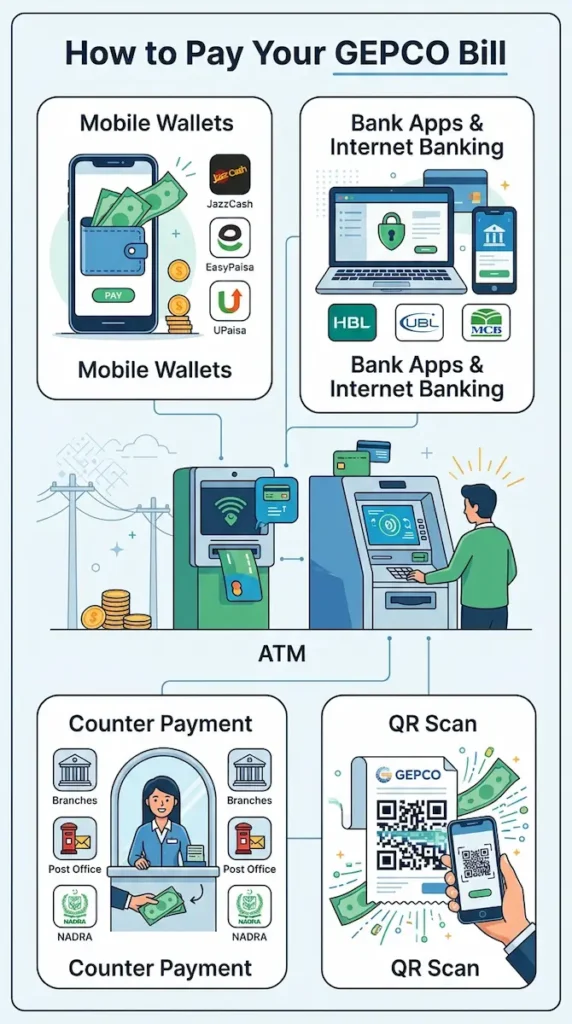
GEPCO does not take payment on its own website. Every route below goes through a bank, a wallet or an authorised agent.
- Mobile wallets — JazzCash, EasyPaisa, UPaisa. Fastest option, posts quickly, sometimes carries a small transaction fee.
- Bank apps and internet banking — HBL, UBL, MCB, Allied, Bank Alfalah, National Bank and most others list GEPCO under utility billers. Add it once and it stays saved.
- ATM — most bank ATMs carry a bill payment option.
- Counter payment — bank branches, post offices and NADRA e-Sahulat points. Usually free, but slower to post and slower to queue.
- QR scan — the code beside the GEPCO logo at the top of your bill opens payment directly.
Partial payment is available through some channels where a bill is in dispute or under instalment. Whichever route you use, keep the receipt until the PAID stamp appears on the portal.
Bill Not Found or Not Loading? Here’s Why
- One digit is wrong. By a wide margin the most common cause. The progress bar and the completion check in the tool above catch a wrong length before you submit, but they cannot catch a correct number of wrong digits. Read it again from the bill, slowly.
- Spaces, dashes or a trailing letter. The tool strips these automatically. If you are entering the number somewhere else, remove them yourself.
- Wrong tab. A 14-digit number entered under Customer ID will not resolve, and neither will a 10-digit number entered under Reference No. Check which tab is highlighted.
- The cycle has not closed. A new bill appears a few days after your usual reading date. Until then the portal shows the previous month. Wait two or three days and try again.
- A brand new connection. No bill exists until the first cycle completes, which can take one or two months after installation.
- Server load or maintenance. The portal slows in the evenings and near due dates, and is occasionally down for maintenance. This is on PITC’s side and affects every bill-check site equally.
If none of it works, call 118, send your reference number by SMS to 8118, or use the GEPCO Smart app.
GEPCO Districts, Sub-Divisions and Local Offices
GEPCO distributes electricity across the Gujranwala region of northern Punjab.
District | Sub-districts |
|---|---|
Gujranwala | Gujranwala City, Gujranwala Rural, Nowshera Virkan, Kamoke |
Sialkot | Sialkot, Daska, Pasrur, Sambrial |
Gujrat | Gujrat, Kharian, Lala Musa, Dinga, Sarai Alamgir, Jalalpur Jattan, Kunjah |
Hafizabad | Hafizabad, Pindi Bhattian, Jalalpur Bhattian, Sukheke |
Narowal | Narowal, Shakargarh, Zafarwal |
Mandi Bahauddin | Mandi Bahauddin, Phalia, Malakwal |
Wazirabad | Wazirabad, Ali Pur Chatha |
Wazirabad was separated from Gujranwala as an administrative district in 2022 and remains within GEPCO’s supply area. For anything local, the district is not the useful unit. The Sub Division printed in the Consumer Detail box of your bill is the office that holds your account, handles your meter and processes your complaint. Quote it when you call, and quote it when you walk in.
Head office: 565/A Grand Trunk Road, Industrial Estate Model Town, Gujranwala 52250 Helpline: 118 (24 hours) · SMS: 8118 Alternate numbers: +92-55-9200504, +92-55-9200516, +92-55-9200592
Complaints, Overbilling and Meter Problems
Five routes, roughly in order of speed.
- Helpline 118 — round the clock, for outages, faults and billing queries. Alternate numbers if the line is busy: +92-55-9200504, +92-55-9200516, +92-55-9200592.
- SMS 8118 — send your reference number for account and meter reading information.
- CCMS (ccms.pitc.com.pk) — the online complaint system used across the distribution companies. It issues a tracking number, which matters if the matter drags on.
- Your Sub Division office — the name is printed in the Consumer Detail box on your bill. For a meter change, a disputed reading or anything needing a site visit, this is the office that actually holds your file.
- NEPRA — if GEPCO does not resolve it, escalate to the regulator through the Asaan Approach app. This channel is referenced on the bill itself.
What makes a complaint move
Most billing complaints stall for one reason: they do not contain enough for anyone to act on. “My bill is wrong” comes back asking for details, and a week is gone.
Send everything in the first message:
- Your reference number and billing month
- Units billed and the amount charged
- The Present Reading printed on the bill, and the reading currently showing on your meter face
- The reading visible in the meter photograph on your bill, if it differs
- Your units and amount for a recent normal month, taken from the Bill History table
That meter photograph is the part people overlook. It is dated, timestamped and geotagged, and it was taken by GEPCO’s own reader. If the digits in it do not match the Present Reading you were billed on, attach it. It is the strongest single piece of evidence you can put in front of the office, and it is already printed on the bill in your hand.
GEPCO Privatisation: What It Means for Your Bill
GEPCO is in the first batch of distribution companies being privatised, alongside FESCO and IESCO.
Where the process stands, as of August 2026:
- Expressions of Interest for GEPCO closed on 21 August 2026. The Privatisation Commission received bids from eleven investors seeking 51% to 100% of the company with management control.
- The bidders include three Turkish companies — Aktor Elektrik Enerji Yatırımları, Genvera Enerji and Cengiz Enerji — a Saudi firm, Al Sharif Contracting and Commercial Development Company, and several Pakistani business groups.
- FESCO drew twelve bids by its 7 August deadline. IESCO’s deadline is 21 September 2026 at 4:00 PM (PKT).
- Bids are now assessed against prequalification criteria. Those that pass move to a Virtual Data Room for due diligence.
- The Power Division has told the Public Accounts Committee it expects the first batch to complete by early 2027.
- Separately, a Senate sub-committee has referred the matter to the Council of Common Interests, arguing that a sale without its consent would conflict with Articles 154 and 157 of the Constitution.
What changes for you right now: nothing. Your reference number, your bill, the PITC portal and every payment channel work exactly as they did before.
Tariffs are set by NEPRA, not by GEPCO and not by whoever ends up owning it. That does not change with ownership. Whether service quality, load shedding or complaint handling improve under private management is a genuinely open question, and anyone answering it confidently right now is guessing.
This section is updated as the process moves.
Frequently Asked Questions
Can I check my GEPCO bill by CNIC?
No. The portal accepts only the 14-digit Reference No or the 10-digit Customer ID. There is no name, CNIC or meter number search. Avoid any site offering CNIC-based bill lookup — it does not work, and entering your identity card number there is a risk.
How do I find my reference number if I lost every bill?
Check your JazzCash, EasyPaisa or bank app payment history first — the number is stored against past transactions. Then your meter card, your phone gallery, or a neighbour’s bill, which shares your opening digits. Otherwise call 118 or visit your Sub Division office with your CNIC.
Is the downloaded duplicate valid for payment?
Yes. It carries the same barcode, reference number and amounts as the posted copy. Banks, post offices and e-Sahulat points accept it, and most counters will scan the barcode straight off your phone screen without a printout.
How do I see last year’s bills?
The portal shows the current bill only. For history, use the Bill History table printed on any generated bill, which covers the previous twelve months of units, amounts and payments. For a specific older bill, request it in writing at your Sub Division office.
Where is the Tax Certificate?
There are two tabs at the top of the portal view: Bill and Tax Certificate. The second gives you a statement of income tax deducted through your electricity bills, which is what you need for a tax return or an adjustment claim. It prints the same way.
Why does my bill say Pro-Rata?
Your meter was read part-way through the cycle rather than at month end, so only part of your usage was billed. The rest appears as Outstanding Units and carries to next month. It is not an error, but it does explain a low bill followed by a high one.
Why did my bill double when my usage barely changed?
Usually the slab. Unprotected domestic consumers are billed at the rate of the slab their total lands in, so crossing a threshold raises the rate on every unit, not just the extra ones. Losing protected status has the same effect and lasts six months.
What is FPA on my bill?
Fuel Price Adjustment. NEPRA notifies it monthly to settle the difference between projected and actual fuel costs, and it can be positive or negative. Your bill prints a line stating which month’s adjustment is included and what it added in rupees.
How do I know if I’m Protected or Unprotected?
Look at the Category field in the Consumer Detail box. Protected status requires staying at or below the monthly threshold for six consecutive months. Crossing it once moves you to unprotected rates, and the six-month clock starts again from scratch.
What happens if I miss the due date?
Your bill prints the later amounts and their cut-off dates, so there is nothing to calculate. One missed bill does not risk disconnection. A second consecutive unpaid bill brings a notice, after which disconnection becomes possible and reconnection requires arrears, surcharge and a reconnection fee.
Does the QR code on my bill work?
Yes, both of them. The code beside the GEPCO logo opens payment. The one near the charges section opens the detailed charge breakdown. Your phone camera reads them directly — no scanner app needed. Scanning avoids mistyping fourteen digits.
Is this the official GEPCO website?
No. This is an independent site. Your number is passed to the official PITC portal at bill.pitc.com.pk, which is where your bill is generated and displayed. GEPCO’s own site is gepco.com.pk.
About This Page and How It Is Verified
What is verified, and against what: Tariff rates on this page are taken from NEPRA S.R.O. 279(I)/2026 and checked against the notified schedule. The SRO number sits directly beneath the rate tables.
Every bill field described here — Consumer Detail, Meter Info, Bill Charges Breakdown, Bill History, the meter photograph, the QR codes — is described from a current GEPCO bill, not from a template. Sample images are redacted. The check steps match this tool’s behaviour, tested against the live PITC portal.