GEPCO New Connection 2026 — Apply Online, Documents & Demand Notice
A GEPCO new connection is applied for through the government’s Electricity New Connection portal at enc.com.pk. You submit the form with five documents, receive a Tracking ID, wait for a site survey, then pay the demand notice at a bank. The meter is installed after your payment is verified. Most domestic connections take four to six weeks.
Before you apply: decide your load and category
Two decisions on the form follow you for the life of the connection.
Connection category is set by load:
| Category | Load | Typical use |
|---|---|---|
| 1 | Up to 15 kW | Homes, small shops |
| 2 | 16–70 kW, 400V | Larger commercial |
| 3 | 71–500 kW, 400V | Industrial units |
Sanctioned load is the harder one. Declare too little and you face a load enhancement application later, with its own file and its own demand notice. Declare too much and you pay a higher fixed charge every month, forever, on a capacity you never use.
A typical home running fans, lights, a refrigerator and one air conditioner sits comfortably at 2–3 kW. Add a second AC or a water motor and you’re closer to 5 kW. Above 5 kW you move onto a three-phase meter and Time of Use billing, which changes the rate structure entirely.
Work out what that load costs you monthly with the GEPCO bill calculator before you commit to a figure on the form.
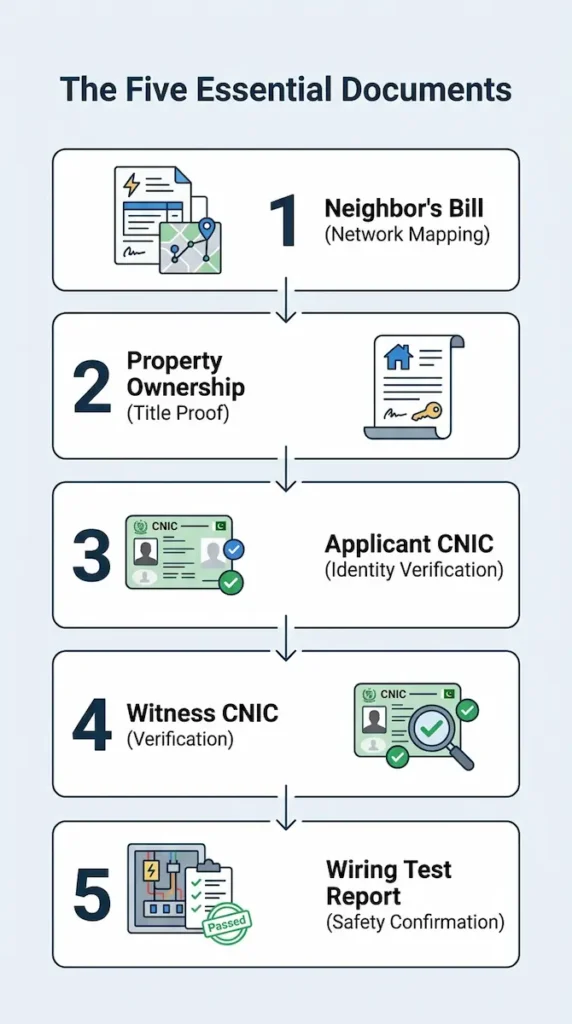
The five documents, and what each one is actually for
Every guide lists these. Almost none explains why they’re asked for, which is what tells you whether a substitute will be accepted.
- Neighbour’s electricity bill copy. This is the most important document in the file and the one people treat as an afterthought. GEPCO’s technical staff use it to locate your premises on their network — the reference number tells them your sub-division, and the bill tells them which transformer and feeder will serve you. Without it, the survey team has nothing to work from. Use a bill from the closest connected property, not a relative across town.
- Property ownership document. Registry, allotment letter or sale deed. If you don’t own the premises, you need an owner’s permit on stamp paper instead.
- Attested CNIC of the applicant. Attestation by an Oath Commissioner or a Grade-1 officer.
- Attested CNIC of a witness. Usually the neighbour whose bill you attached.
- Wiring contractor’s test report. Signed by a licensed contractor confirming your internal wiring is complete and safe. GEPCO will not energise a meter into untested wiring, and this is where files most often stall — applicants apply before the wiring is finished.
Uploads to the portal must be JPEG. Scan or photograph each document flat, in daylight, with all four corners visible.
Applying through the ENC portal
The portal at enc.com.pk serves every distribution company. Its sidebar carries eight options: Home, Track, Apply, Change, Print Form, Print DN, Pay DN and Upload DN. You will use most of them before this is over.
- Open Apply and select your sub-division and category type.
- Enter your neighbour’s reference number when prompted. This anchors your application to a location on the network.
- Fill in applicant particulars, contact details and premises details.
- Upload the five documents.
- Submit, and save the Tracking ID immediately. Screenshot it. Write it down. Every later step needs it, and recovering it is far harder than keeping it.
- Use Print Form with your Tracking ID to generate the printed application.
- Attach hard copies of all five documents to that printout and submit the file to your sub-division office.
That last step catches people out. The online submission does not complete the application on its own. The physical file must reach the office, and the window for doing so is short — allow around three weeks, and don’t test it. If preparing the file is a problem, stamp vendors outside most sub-division offices will assemble and submit it for Rs 500–700. That’s a legitimate convenience, not a bribe. Anything asked for beyond it is not.
Tracking, and what each status means
Open Track, choose New Connection, select GEPCO, enter your Tracking ID or CNIC.
| Status | What it means | What to do |
|---|---|---|
| Pending | Received, queued for verification | Wait. Confirm the physical file was logged. |
| Under Review | Documents being checked | Nothing yet. |
| Site Visit Pending | Survey not yet done | Make sure someone can access the premises. |
| Review Completed | Survey done, DN being prepared | Watch for the next status. |
| Pay Demand Notice Fee | DN issued | Act now. See below. |
| Approved | Payment verified | Installation scheduled. |
If a status sits unchanged for more than two weeks, take your Tracking ID to the sub-division office named on your neighbour’s bill. Files stall on missing attestations and incomplete wiring reports far more often than on anything else.
The demand notice — and the mistake that costs you everything
Once the survey is done, GEPCO issues a Demand Notice: an itemised invoice for the meter, security deposit, service line and any equipment needed to reach your property.
Download it through Print DN on the portal.
Every demand notice carries an expiry date printed on it. Miss that date and the system cancels your application automatically. Not suspends — cancels. You start the entire process again, new file, new documents, new survey. This is the single most expensive mistake in the whole procedure, and it is entirely avoidable. When the status flips to Pay Demand Notice Fee, download the DN that day and check the deadline before anything else.
Pay at a designated bank, then do both of these:
- Upload the scanned paid copy through Upload DN on the portal
- Hand the stamped paid copy to your sub-division office in person
The portal does not always sync quickly. Physically delivering the receipt is what moves the file.
What it actually costs
Two figures circulate, and they don’t agree. Older guidance across most sites puts a single-phase domestic demand notice at Rs 9,000–12,000, with three-phase at Rs 36,000–50,000.
More recent figures reflecting the shift to AMR meters put a single-phase AMR meter at around Rs 17,500 plus roughly Rs 2,440 security deposit, and a three-phase AMR meter near Rs 48,256. The gap is the meter itself. GEPCO has been moving new connections onto AMR meters, which cost considerably more than the older type. If your demand notice comes in above the older range, that’s likely why.
Two things push the total higher:
- The standard notice covers the meter and roughly 40 metres of service wiring. Beyond that, you pay for the additional conductor.
- If the nearest pole is more than 100 metres from your meter board, a separate pole and demand notice is raised covering the LT wire, an additional pole and associated equipment. The amount depends entirely on the distance.
Ask your sub-division for a site-specific estimate before budgeting. Nobody can quote this accurately from a webpage.
After the meter is installed
Once payment is verified and the meter goes up, installation is typically scheduled within about two weeks. Your billing does not start immediately. It is normal to receive nothing for the first month, sometimes two, while your connection is entered into the billing system and assigned a reference number. Until that happens, no reference number exists, which means there is nothing to look up on any bill portal.
Once your first bill is generated, you can Check your Bill online in seconds using the reference number printed on it. If three months pass with no bill at all, that is not normal. Take your paid demand notice to the sub-division office — an unbilled live connection accumulates units that will eventually arrive as a single large arrear.
FAQs
Can I apply without owning the property?
Yes, with an owner’s permit on stamp paper in place of ownership documents.
Can I apply before the wiring is finished?
You can submit, but the file will stall at the wiring test report. Finish the internal wiring first.
What if I lost my Tracking ID?
Track by CNIC on the portal instead. If that fails, the sub-division office can retrieve it from your submitted file.
Can the demand notice be paid online?
Yes, through Pay DN on the portal, or at any designated bank branch.
How long does the whole process take?
Four to six weeks for a straightforward domestic connection where the network already reaches your street. Longer where an extension is required, or where the file is returned for a missing attestation.